MenuthereMenuthere

Features

All featuresEverything Menuthere does, in one listPetpooja Integration0% commission with Petpooja POSWhatsApp OrderingCustomers order by sending “Hi”Google Business SyncSync menu to Google Maps

By role

OwnersOversee operations and grow revenueAgenciesManage multiple client accounts easily

By industry

RestaurantsCafés & Coffee ShopsBakeriesCloud KitchensHotels & ResortsFood Trucks
FeaturesEvery feature, explained simplyFree ToolsQR cards, price calculators, posters and moreFree WhatsApp Order PageTake orders on WhatsApp from one free linkDocsHow every feature works, step by stepHelp CenterGet support and find answersDownload AppGet the app for iOS and AndroidWhatsApp Cost CalculatorWhat Meta's per-message rates cost youCommission CalculatorWhat delivery apps really take per order
PricingBlogDocs
Log inBook a demo
MenuthereMenuthere

Features

All featuresPetpooja IntegrationWhatsApp OrderingGoogle Business Sync

By role

OwnersAgencies

By industry

RestaurantsCafés & Coffee ShopsBakeriesCloud KitchensHotels & ResortsFood Trucks
FeaturesEvery feature, explained simplyFree ToolsQR cards, price calculators, posters and moreFree WhatsApp Order PageTake orders on WhatsApp from one free linkDocsHow every feature works, step by stepHelp CenterGet support and find answersDownload AppGet the app for iOS and AndroidWhatsApp Cost CalculatorWhat Meta's per-message rates cost youCommission CalculatorWhat delivery apps really take per order
PricingBlogDocs
Book a demoLog in
Loading…
How to Scan a Restaurant QR Code Menu in 10 Seconds
← Blog

The 10-Second Guide to Scanning a Restaurant QR Menu

QR code menus have gone from a pandemic workaround to a permanent fixture in modern dining — and for good reason. They're faster, always up-to-date, and far cheaper than reprinting paper menus every time you change a dish or price. If your restaurant uses Menuthere, your customers are one scan away from your full digital menu — with photos, modifiers, allergen info, and direct ordering. This guide walks them through exactly how to do it on any device.

March 6, 2026

More articles

  • Previous article

    The Real Cost of a Printed Menu (Most Restaurant Owners Have Never Done This Math)

    Do you think that your printed menu costs ₹10,000 only ? Think again. Here's the full cost breakdown — printing, reprints, lost revenue, and missed upsells — that most restaurant owners actually never calculate.

  • Next article

    Global Restaurant Prices Are Rising — Here's What Indian Restaurant Owners Should Do Right Now

Menuthere

The all-in-one online ordering and delivery platform for restaurants. Launch your own website, skip aggregator commissions, and grow your business.

Features

  • All features
  • QR code menu
  • Table ordering
  • Online ordering
  • WhatsApp ordering
  • Billing & POS
  • Delivery management
  • Loyalty program
  • WhatsApp marketing

Solutions

  • Restaurants
  • Cafés
  • Cloud kitchens
  • Bakeries
  • Petpooja Integration
  • Google Business Sync
  • Owners
  • Agencies

Resources

  • Help Center
  • Docs
  • Blog
  • Commission calculator
  • WhatsApp cost calculator
  • Free tools
  • Free WhatsApp order page
  • Compare
  • Video tutorials
  • Download App
  • Get started

Legal

  • Privacy Policy
  • Terms of Service
  • Refund Policy
© 2026 Menuthere. All rights reserved.


What is a QR Code Menu?

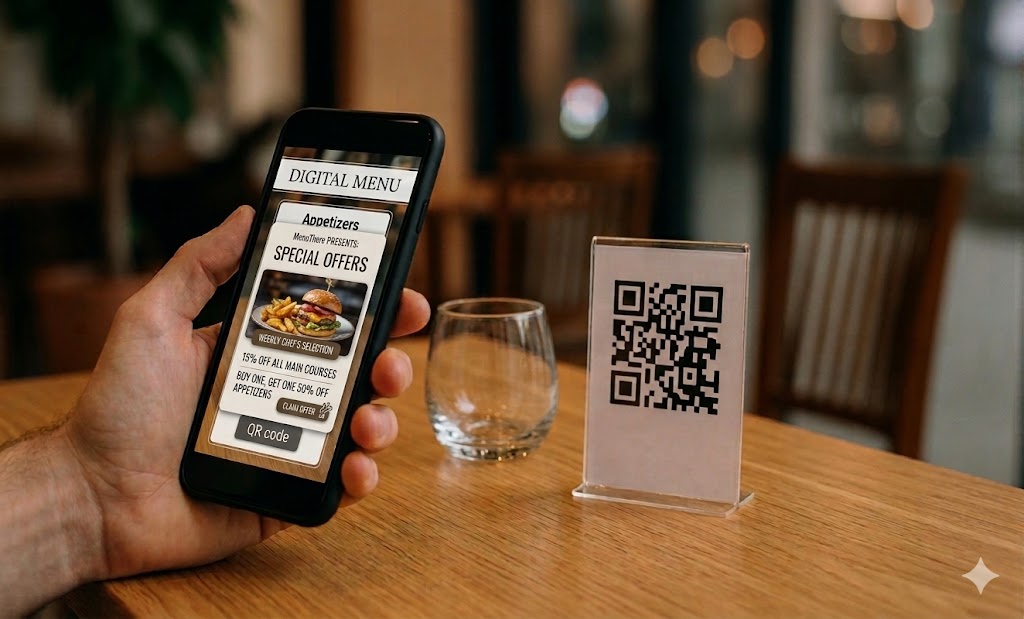
A QR code menu is a scannable code that opens your restaurant's digital menu instantly in a customer's browser — no app download needed.

With Menuthere, that menu isn't just a static PDF. It's an interactive, mobile-first experience where guests can:

  • Browse your full menu with dish photos

  • Filter by dietary preferences or allergens

  • Customize their order (add-ons, spice level)

  • Place their order and pay — all from their phone

  • Or download the Menuthere app for a dedicated menu browsing experience`

The QR code can be placed on tables, countertops, packaging, receipts, or even your storefront window.


Scanning on Android

Most Android devices running Android 8 or above have built-in QR scanning — no third-party app required.

Option 1: Native Camera App (Easiest)

  1. Make sure you're connected to WiFi or mobile data.

  2. Open your Camera app.

  3. Point it at the QR code — center it in the frame.

  4. A banner notification will appear at the top. Tap it.

  5. Your browser opens directly to the restaurant's Menuthere menu.

Option 2: Google Lens

  1. Open Google Assistant or the Google app.

  2. Tap the Lens icon (next to the microphone).

  3. Point your camera at the QR code.

  4. Tap the notification that appears to open the menu.

Option 3: Browser-Based Scanner (No App, No Camera Permission Prompts)

  1. Open your browser and go to any online QR scanner (e.g., webqr.com).

  2. Allow camera access when prompted.

  3. Point at the QR code — the menu link appears instantly.

  4. Tap the link to open your Menuthere menu.

BONUS:
Download the Menuthere app (iOS & Android) to browse menus from any Menuthere-powered restaurant — all in one place.


Scanning on iPhone

iPhones running iOS 11 or higher (iPhone 5s and newer) have native QR scanning built in.

Option 1: Native Camera App (Easiest)

  1. Open your Camera app from the Home Screen or Lock Screen.

  2. Point it at the QR code — no need to press anything.

  3. A notification banner appears. Tap it.

  4. Your Safari browser opens the restaurant's Menuthere menu.

Option 2: Control Center QR Reader

If your camera isn't scanning for some reason:

  1. Go to Settings → Control Center → Customize Controls.

  2. Add QR Code Reader by tapping the green + icon.

  3. Swipe down from the top-right to open Control Center.

  4. Tap the QR Code Reader icon and point at the code.

  5. The menu opens automatically.


Recommended Third-Party QR Scanner Apps

If a customer is on an older device, any of these free apps work well:

App

Platform

Notes

QR TIGER

iOS & Android

Clean UI, ad-free, scan history

QR Code Reader (Scan)

iOS & Android

Auto-scans without pressing buttons

Neoreader

iOS & Android

Works at any angle

ME-QR

iOS & Android

Saves scan history


Why Menuthere QR Menus Work Better for Your Restaurant

Most QR code solutions stop at showing a menu. Menuthere goes further:

For your guests:

  • Instant access — scans in under 2 seconds

  • Always shows your current menu (no stale printed versions)

  • Order and pay from the table, reducing wait times

  • Works on any smartphone, no app download required

For your restaurant:

  • Update items, prices, and availability in real time

  • Reduce menu printing costs entirely

  • Collect order data and understand what's selling

  • Works for dine-in, takeaway, and delivery storefronts


Setting Up QR Codes on Menuthere

If you're a restaurant owner and want to get your QR menu live:

  1. Sign up at menuthere.com — free to start

  2. Add your menu — categories, dishes, photos, prices, modifiers

  3. Generate your QR code — download and print it in minutes

  4. Place it — tables, counters, receipts, social media, your storefront

Your customers can start ordering the same day.


FAQs

Do customers need to download an app? Not necessarily — Menuthere menus open directly in the browser with no app required. But if you prefer a dedicated experience, you can also download the Menuthere app on iOS and Android to browse menus directly.

What if a customer's phone can't scan QR codes? They can use any free QR scanner app (see the list above) or type your menu URL directly.

Can customers order and pay through the QR menu? Yes — Menuthere supports full digital ordering and payment collection through the menu, not just menu browsing.

Does the QR code change if I update my menu? No. The QR code stays the same. Only the menu content updates — instantly, without reprinting anything.

Can I use QR codes for delivery too? Yes. Menuthere lets you build a delivery storefront that works alongside your dine-in QR menu.


Ready to replace your printed menus? Get started with Menuthere →

Put this into practice

Commission-free online ordering

Your own ordering website for delivery, takeaway and dine-in, with 0% commission on every order.

A headline made the rounds this week: consumers are trading down as rising wages and operating costs force restaurants to raise menu prices. It sounds like a Western problem. Large chains, minimum wage hikes, inflation. But if you run a restaurant in India, you should read this closely — because the same pressure is quietly building here.

  • QR menus·September 24, 2026

    QR Code Ordering vs Paper Menus: How Restaurants Can Serve Faster With the Same Team

    The fastest way to serve faster is not hiring another server. It is removing the wait that happens before the order is even placed.

  • Operations·August 22, 2026

    You Already Get Blamed When the Rider Is Late

    Owners avoid direct ordering because a failed delivery becomes their fault. The research says customers already blame the restaurant. You carry the blame without the control.

Browse all articles →